AM62D Platforms
Introduction:
The AM62D2 SoC belongs to the K3 Multicore SoC architecture with DSP core targeted for applications needing high-performance Digital Signal Processing. It is used in applications like automotive audio systems, professional sound equipment, radar and radio for aerospace, sonar in marine devices, and ultrasound in medical imaging. It also supports precise signal analysis in test and measurement tools.
Some highlights of AM62D2 SoC are:
Quad-Cortex-A53s (running up to 1.4GHz) in a single cluster. Dual/Single core variants are provided in the same package to allow HW compatible designs.
One Device manager Cortex-R5F for system power and resource management, and one Cortex-R5F for Functional Safety or general-purpose usage.
DSP with Matrix Multiplication Accelerator(MMA) (up to 2 TOPS) based on single core C7x.
3x Multichannel Audio Serial Ports (McASP) Up to 4/6/16 Serial Data Pins which can Transmit and Receive Clocks up to 50MHz, with multi-channel I2S and TDM Audio inputs and outputs.
Integrated Giga-bit Ethernet switch supporting up to a total of two external ports with TSN capable to enable audio networking features such as, Ethernet Audio Video Bridging (eAVB) and Dante.
9xUARTs, 5xSPI, 6xI2C, 2xUSB2, 3xCAN-FD, 3x eMMC and SD, OSPI memory controller, 1x CSI-RX-4L for Camera, eCAP/eQEP, ePWM, among other peripherals.
Dedicated Centralized Hardware Security Module with support for secure boot, debug security and crypto acceleration and trusted execution environment.
One 32 bit DDR Subsystem that supports LPDDR4, DDR4 memory types.
Low power mode support: Partial IO support for CAN/GPIO/UART wakeup.
This SoC is of part K3 AM62x family, which includes the AM62A and AM62P variants. While the AM62A and AM62D are largely similar, the AM62D is specifically targeted for general-purpose DSP applications, whereas the AM62A focuses on edge AI workloads. A key distinction is that the AM62D does not include multimedia components such as the video encoder/decoder, MJPEG encoder, Vision Processing Accelerator (VPAC) for image signal processing, or the display subsystem. Additionally, the AM62D has a different pin configuration compared to the AM62A, which impacts embedded software development.
More details can be found in the Technical Reference Manual: https://www.ti.com/lit/pdf/sprujd4
Platform information:
Boot Flow:
Below is the pictorial representation of boot flow:

Here TIFS acts as master and provides all the critical services. R5/A53 requests TIFS to get these services done as shown in the above diagram.
Sources:
Das U-Boot
branch: masterTrusted Firmware-A (TF-A)
branch: masterOpen Portable Trusted Execution Environment (OP-TEE)
branch: masterTI Firmware (TIFS, DM, SYSFW)
branch: ti-linux-firmware
Note
The TI Firmwares required for functionality of the system are (see platform specific boot diagram for further information as to which component runs on which processor):
TIFS - TI Foundational Security Firmware - Consists of purely firmware meant to run on the security enclave.
DM - Device Management firmware also called TI System Control Interface server (TISCI Server) - This component purely plays the role of managing device resources such as power, clock, interrupts, dma etc. This firmware runs on a dedicated or multi-use microcontroller outside the security enclave.
TIFS Stub - The TIFS stub is a small piece of binary designed to help restore the required security context and resume the TIFS firmware when the system resumes from low-power modes such as suspend-to-RAM/Deep Sleep. This stub uses the same encryption and customer key signing model as TIFS and is loaded into the ATCM (Tightly Coupled Memory ‘A’ of the DM R5) during DM startup. Due to the independent certificate signing process, the stub is maintained separately from DM.
Build procedure:
Setup the environment variables:
S/w Component |
Env Variable |
Description |
|---|---|---|
All Software |
CC32 |
Cross compiler for ARMv7 (ARM 32bit), typically arm-linux-gnueabihf- |
All Software |
CC64 |
Cross compiler for ARMv8 (ARM 64bit), typically aarch64-linux-gnu- |
All Software |
LNX_FW_PATH |
Path to TI Linux firmware repository |
All Software |
TFA_PATH |
Path to source of Trusted Firmware-A |
All Software |
OPTEE_PATH |
Path to source of OP-TEE |
S/w Component |
Env Variable |
Description |
|---|---|---|
U-Boot |
UBOOT_CFG_CORTEXR |
Defconfig for Cortex-R (Boot processor). |
U-Boot |
UBOOT_CFG_CORTEXA |
Defconfig for Cortex-A (MPU processor). |
Trusted Firmware-A |
TFA_BOARD |
Platform name used for building TF-A for Cortex-A Processor. |
Trusted Firmware-A |
TFA_EXTRA_ARGS |
Any extra arguments used for building TF-A. |
OP-TEE |
OPTEE_PLATFORM |
Platform name used for building OP-TEE for Cortex-A Processor. |
OP-TEE |
OPTEE_EXTRA_ARGS |
Any extra arguments used for building OP-TEE. |
Set the variables corresponding to this platform:
export CC32=arm-linux-gnueabihf-
export CC64=aarch64-linux-gnu-
export LNX_FW_PATH=path/to/ti-linux-firmware
export TFA_PATH=path/to/trusted-firmware-a
export OPTEE_PATH=path/to/optee_os
export UBOOT_CFG_CORTEXR=am62dx_evm_r5_defconfig
export UBOOT_CFG_CORTEXA=am62dx_evm_a53_defconfig
export TFA_BOARD=lite
# we dont use any extra TFA parameters
unset TFA_EXTRA_ARGS
export OPTEE_PLATFORM=k3-am62ax
# we dont use any extra OPTEE parameters
unset OPTEE_EXTRA_ARGS
Trusted Firmware-A:
# inside trusted-firmware-a source
make CROSS_COMPILE=$CC64 ARCH=aarch64 PLAT=k3 SPD=opteed $TFA_EXTRA_ARGS \
     TARGET_BOARD=$TFA_BOARD
OP-TEE:
# inside optee_os source
make CROSS_COMPILE=$CC32 CROSS_COMPILE64=$CC64 CFG_ARM64_core=y $OPTEE_EXTRA_ARGS \
      PLATFORM=$OPTEE_PLATFORM
U-Boot:
3.1 R5:
# inside u-boot source
make $UBOOT_CFG_CORTEXR
make CROSS_COMPILE=$CC32 BINMAN_INDIRS=$LNX_FW_PATH
3.2 A53:
# inside u-boot source
make $UBOOT_CFG_CORTEXA
make CROSS_COMPILE=$CC64 BINMAN_INDIRS=$LNX_FW_PATH \
       BL31=$TFA_PATH/build/k3/$TFA_BOARD/release/bl31.bin \
       TEE=$OPTEE_PATH/out/arm-plat-k3/core/tee-raw.bin
Note
It is also possible to pick up a custom DM binary by adding TI_DM argument pointing to the file. If not provided, it defaults to picking up the DM binary from BINMAN_INDIRS. This is only applicable to devices that utilize split firmware.
Target Images
In order to boot we need tiboot3.bin, tispl.bin and u-boot.img. Each SoC variant (HS-FS, HS-SE) requires a different source for these files.
HS-FS
tiboot3-am62ax-hs-fs-evm.bin from step 3.1
tispl.bin, u-boot.img from step 3.2
HS-SE
tiboot3-am62ax-hs-evm.bin from step 3.1
tispl.bin, u-boot.img from step 3.2
Image formats:
tiboot3.bin

tispl.bin

Switch Setting for Boot Mode
Boot Mode pins provide means to select the boot mode and options before the device is powered up. After every POR, they are the main source to populate the Boot Parameter Tables.
The following table shows some common boot modes used on AM62D platform. More details can be found in the Technical Reference Manual: https://www.ti.com/lit/pdf/sprujd4 under the Boot Mode Pins section.
Switch Label |
SW2: 12345678 |
SW3: 12345678 |
|---|---|---|
SD |
01000000 |
11000010 |
OSPI |
00000000 |
11001110 |
EMMC |
00000000 |
11010010 |
UART |
00000000 |
11011100 |
USB DFU |
00000000 |
11001010 |
For SW2 and SW1, the switch state in the “ON” position = 1.
Falcon Mode
Falcon Mode on AM62dx platforms bypasses the A53 SPL and U-Boot with the overall boot flow as below:
Normal boot flow:
         | tiboot3.bin |         tispl.bin          | u-boot.img |  Image  |
         |-------------+----------------------------+------------+---------|
R5 Core  |    SPL      |                            |            |         |
---------|       \     |                            |            |         |
A53 Core |        ------> TFA -> OP-TEE -> A53 SPL -->  U-Boot  --> Kernel |
With falcon mode:
         | tiboot3.bin |   tifalcon.bin   | fitImage |
         |-------------+------------------+----------|
R5 Core  |    SPL      |                  |          |
---------|       \     |                  |          |
A53 Core |        ------> TFA -> OP-TEE  -->  Kernel |
Build Process
Enabling falcon mode requires re-building TFA, U-Boot and the kernel
fitImage as follows:
0. Setup environment variables:
Refer to the build procedure above for setting up the environment variables.
1. Trusted Firmware-A:
The R5 SPL in falcon mode loads the kernel at 0x82000000 and the
corresponding DTB at 0x88000000. Therefore TFA needs to be rebuild with
changes to the respective addresses.
# Change load addresses for the kernel and DTB
export TFA_EXTRA_ARGS="PRELOADED_BL33_BASE=0x82000000 K3_HW_CONFIG_BASE=0x88000000"
# inside trusted-firmware-a source
make CROSS_COMPILE=$CC64 ARCH=aarch64 PLAT=k3 SPD=opteed $TFA_EXTRA_ARGS \
     TARGET_BOARD=$TFA_BOARD
2. U-Boot:
2.1 R5:
# use the common falcon config fragment for all K3 platforms
export $UBOOT_FALCON_CFG_FRAGMENTR="k3_r5_falcon.config"
export UBOOT_CFG_CORTEXR="${UBOOT_CFG_CORTEXR} ${UBOOT_FALCON_CFG_FRAGMENTR}"
# inside u-boot source
make $UBOOT_CFG_CORTEXR
make CROSS_COMPILE=$CC32 BINMAN_INDIRS=$LNX_FW_PATH
2.2 A53:
After rebuilding TFA, the binary needs to be repackaged inside the tispl binaries:
# inside u-boot source
make $UBOOT_CFG_CORTEXA
make CROSS_COMPILE=$CC64 BINMAN_INDIRS=$LNX_FW_PATH \
       BL31=$TFA_PATH/build/k3/$TFA_BOARD/release/bl31.bin \
       TEE=$OPTEE_PATH/out/arm-plat-k3/core/tee-raw.bin
Note
It is also possible to pick up a custom DM binary by adding TI_DM argument pointing to the file. If not provided, it defaults to picking up the DM binary from BINMAN_INDIRS. This is only applicable to devices that utilize split firmware.
3. fitImage:
Warning
The fitImage available by default under boot/fitImage in rootfs of
the standard SDK release is not compatible with falcon mode.
For authenticated boot in falcon mode, the compute heavy authentication
required for the fitImage is offloaded from the slower R5 core to TIFS. This
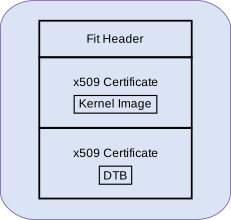
requires fitImage to package the necessary binaries (kernel and dtb) with a
pre-signed x509 certificate.
fitImage for falcon mode:
Sources
Core Secdev K3
branch: master
Follow the steps below to create a falcon compatible fitImage:
3.1 Environment setup
export DTB=path/to/dtb
export IMAGE=path/to/kernel-image
3.2 fitImage creation
An Image tree source (its) file describes the structure and contents of the final image produced by the
mkimagetool.To create the
fitImagefor falcon mode, create a filefitImage.itswith the following contents inside thecore-secdev-k3source directory,:
/dts-v1/;

/ {
    description = "Kernel fitImage";
    #address-cells = <1>;

    images {
        kernel-sec {
            description = "Linux kernel";
            data = /incbin/("Image.sec");
            type = "kernel";
            arch = "arm64";
            os = "linux";
            compression = "none";
            load = <0x82000000>;
            entry = <0x82000000>;
        };

        fdt-sec {
            description = "Flattened Device Tree blob";
            data = /incbin/("falcon.dtb.sec");
            type = "flat_dt";
            arch = "arm64";
            compression = "none";
            load = <0x88000000>;
            entry = <0x88000000>;
        };
    };

    configurations {
        default = "conf-falcon";
        conf-falcon {
            description = "Pre-signed Linux kernel, FDT blob";
            kernel = "kernel-sec";
            fdt = "fdt-sec";
        };
    };
};
Sign the kernel and dtb using secure-binary-image.sh and create the
fitImage using mkimage:
# inside core-secdev-k3 source
cp $IMAGE Image
cp $DTB falcon.dtb
./scripts/secure-binary-image.sh Image Image.sec
./scripts/secure-binary-image.sh falcon.dtb falcon.dtb.sec
mkimage -f fitImage.its fitImage
Usage
Falcon Mode makes use of a cut down variant of the tispl binary called
tifalcon.bin with lacks the Cortex-A SPL and it’s DTBs. This file should
be present alongside the existing tispl.bin after building U-Boot for the
Cortex-A core.
tifalcon.bin

The R5 SPL requires both tifalcon.bin and the fitImage (created
in previous steps) to be present in the second partition of the MMC device
specified by the mmcdev environment variable. By default, mmcdev is
set to 1, which implies that the SD card is the boot media. Additionally, the
bootpart environment variable, which defaults to 1:2, specifies that the
second partition of the SD card should be used as the root file system for the
kernel.
To use eMMC instead of SD as the boot media, rebuild the R5 SPL with the following diff:
diff --git a/board/ti/<soc>/<soc>.env b/board/ti/<soc>/<soc>.env
index 82b9f0741bb..73d59ac425c 100644
--- a/board/ti/<soc>/<soc>.env
+++ b/board/ti/<soc>/<soc>.env
@@ -17,8 +17,8 @@ run_kern=booti ${loadaddr} ${rd_spec} ${fdtaddr}

 boot_targets=mmc1 mmc0 usb pxe dhcp
 boot=mmc
-mmcdev=1
-bootpart=1:2
+mmcdev=0
+bootpart=0:1
 bootdir=/boot
 rd_spec=-
List of files required on SD/eMMC for Falcon Mode:
File |
Copy path on SD/eMMC |
Partition |
Description |
|---|---|---|---|
|
|
rootfs (ext4) |
tispl binary without SPL for the A core and DTB |
|
|
rootfs (ext4) |
kernel and dtb fitImage with pre-signed binaries |
Note
Falcon mode requires the boot binaries to be present in the root file system
of either eMMC or SD, even when using raw eMMC boot mode to load
tiboot3.bin.
R5 SPL Memory Map
Standard Boot:
0x80000000 +===============================+ Start of DDR
  512KiB   |   TFA reserved memory space   | CONFIG_K3_ATF_LOAD_ADDR
           |                               |
0x80080000 +-------------------------------+ PRELOADED_BL33_BASE in TFA
 29.5MiB   |         A53 SPL + DTB +       | CONFIG_SPL_LOAD_FIT_ADDRESS
           | Download region for FIT in DFU|
0x81e00000 +-------------------------------+
           |  R5 U-Boot SPL Stack + Heap   |
    2MiB   |       (size defined by        |
           | SPL_STACK_R_MALLOC_SIMPLE_LEN)|
0x82000000 +-------------------------------+ CONFIG_SPL_STACK_R_ADDR
  112MiB   |            Unused             |
0x89000000 +-------------------------------+
  331MiB   | Device Manager (DM) Load Addr |
0x9db00000 +-------------------------------+
   12MiB   |          DM Reserved          |
0x9e700000 +-------------------------------+
    1MiB   |            Unused             |
0x9e800000 +-------------------------------+ BL32_BASE in TFA
   24MiB   |             OPTEE             |
0xa0000000 +===============================+ End of DDR (512MiB)
Falcon Mode:
0x80000000 +===============================+ Start of DDR
  512KiB   |   TFA reserved memory space   | CONFIG_K3_ATF_LOAD_ADDR
0x80080000 +-------------------------------+
 31.5MiB   |            Unused             |
0x82000000 +-------------------------------+ PRELOADED_BL33_BASE in TFA
           |                               | CONFIG_SYS_LOAD_ADDR
   57MiB   |   Kernel + initramfs Image    | CONFIG_SPL_LOAD_FIT_ADDRESS
           |                               |
0x85900000 +-------------------------------+
           |                               |
           |  R5 U-Boot SPL Stack + Heap   |
   39MiB   |       (size defined by        |
           | SPL_STACK_R_MALLOC_SIMPLE_LEN)|
           |                               |
0x88000000 +-------------------------------+ CONFIG_SPL_STACK_R_ADDR
           |                               | K3_HW_CONFIG_BASE in TFA
   16MiB   |          Kernel DTB           | CONFIG_SPL_PAYLOAD_ARGS_ADDR
           |                               |
0x89000000 +-------------------------------+
  331MiB   | Device Manager (DM) Load Addr |
0x9db00000 +-------------------------------+
   12MiB   |          DM Reserved          |
0x9e700000 +-------------------------------+
    1MiB   |            Unused             |
0x9e800000 +-------------------------------+ BL32_BASE in TFA
   24MiB   |             OPTEE             |
0xa0000000 +===============================+ End of DDR (512MiB)
Debugging U-Boot
See Common Debugging environment - OpenOCD: for detailed setup information.
Warning
AM62A: OpenOCD support since August 2023 (git master)
AM62D: Uses AM62A configuration (compatible due to same core architecture)
Until the next stable release of OpenOCD is available in your development environment’s distribution, it might be necessary to build OpenOCD from the source.
Integrated JTAG adapter/dongle: The board has a micro-USB connector labelled XDS110 USB or JTAG. Connect a USB cable to the board to the mentioned port.
Note
There are multiple USB ports on a typical board, So, ensure you have read the user guide for the board and confirmed the silk screen label to ensure connecting to the correct port.
To start OpenOCD and connect to the board
openocd -f board/ti/am62a7evm.cfg