AM62 Platforms
Introduction:
The AM62 SoC family is the follow on AM335x built on the K3 Multicore SoC architecture platform, providing ultra-low-power modes, dual display, multi-sensor edge compute, security and other BOM-saving integrations. The AM62 SoC targets a broad market to enable applications such as Industrial HMI, PLC/CNC/Robot control, Medical Equipment, Building Automation, Appliances and more.
Some highlights of this SoC are:
Quad-Cortex-A53s (running up to 1.4GHz) in a single cluster. Pin-to-pin compatible options for single and quad core are available.
Cortex-M4F for general-purpose or safety usage.
Dual display support, providing 24-bit RBG parallel interface and OLDI/LVDS-4 Lane x2, up to 200MHz pixel clock support for 2K display resolution.
Selectable GPU support, up to 8GFLOPS, providing better user experience in 3D graphic display case and Android.
PRU(Programmable Realtime Unit) support for customized programmable interfaces/IOs.
Integrated Giga-bit Ethernet switch supporting up to a total of two external ports (TSN capable).
9xUARTs, 5xSPI, 6xI2C, 2xUSB2, 3xCAN-FD, 3x eMMC and SD, GPMC for NAND/FPGA connection, OSPI memory controller, 3xMcASP for audio, 1x CSI-RX-4L for Camera, eCAP/eQEP, ePWM, among other peripherals.
Dedicated Centralized System Controller for Security, Power, and Resource Management.
Multiple low power modes support, ex: Deep sleep, Standby, MCU-only, enabling battery powered system design.
More details can be found in the Technical Reference Manual: https://www.ti.com/lit/pdf/spruiv7
Platform information:
Boot Flow:
Below is the pictorial representation of boot flow:

Here TIFS acts as master and provides all the critical services. R5/A53 requests TIFS to get these services done as shown in the above diagram.
Sources:
Das U-Boot
branch: masterTrusted Firmware-A (TF-A)
branch: masterOpen Portable Trusted Execution Environment (OP-TEE)
branch: masterTI Firmware (TIFS, DM, SYSFW)
branch: ti-linux-firmware
Note
The TI Firmwares required for functionality of the system are (see platform specific boot diagram for further information as to which component runs on which processor):
TIFS - TI Foundational Security Firmware - Consists of purely firmware meant to run on the security enclave.
DM - Device Management firmware also called TI System Control Interface server (TISCI Server) - This component purely plays the role of managing device resources such as power, clock, interrupts, dma etc. This firmware runs on a dedicated or multi-use microcontroller outside the security enclave.
TIFS Stub - The TIFS stub is a small piece of binary designed to help restore the required security context and resume the TIFS firmware when the system resumes from low-power modes such as suspend-to-RAM/Deep Sleep. This stub uses the same encryption and customer key signing model as TIFS and is loaded into the ATCM (Tightly Coupled Memory ‘A’ of the DM R5) during DM startup. Due to the independent certificate signing process, the stub is maintained separately from DM.
Build procedure:
Setup the environment variables:
S/w Component |
Env Variable |
Description |
|---|---|---|
All Software |
CC32 |
Cross compiler for ARMv7 (ARM 32bit), typically arm-linux-gnueabihf- |
All Software |
CC64 |
Cross compiler for ARMv8 (ARM 64bit), typically aarch64-linux-gnu- |
All Software |
LNX_FW_PATH |
Path to TI Linux firmware repository |
All Software |
TFA_PATH |
Path to source of Trusted Firmware-A |
All Software |
OPTEE_PATH |
Path to source of OP-TEE |
S/w Component |
Env Variable |
Description |
|---|---|---|
U-Boot |
UBOOT_CFG_CORTEXR |
Defconfig for Cortex-R (Boot processor). |
U-Boot |
UBOOT_CFG_CORTEXA |
Defconfig for Cortex-A (MPU processor). |
Trusted Firmware-A |
TFA_BOARD |
Platform name used for building TF-A for Cortex-A Processor. |
Trusted Firmware-A |
TFA_EXTRA_ARGS |
Any extra arguments used for building TF-A. |
OP-TEE |
OPTEE_PLATFORM |
Platform name used for building OP-TEE for Cortex-A Processor. |
OP-TEE |
OPTEE_EXTRA_ARGS |
Any extra arguments used for building OP-TEE. |
Set the variables corresponding to this platform:
export CC32=arm-linux-gnueabihf-
export CC64=aarch64-linux-gnu-
export LNX_FW_PATH=path/to/ti-linux-firmware
export TFA_PATH=path/to/trusted-firmware-a
export OPTEE_PATH=path/to/optee_os
export UBOOT_CFG_CORTEXR=am62x_evm_r5_defconfig
export UBOOT_CFG_CORTEXA=am62x_evm_a53_defconfig
export TFA_BOARD=lite
# we dont use any extra TFA parameters
unset TFA_EXTRA_ARGS
export OPTEE_PLATFORM=k3-am62x
export OPTEE_EXTRA_ARGS="CFG_WITH_SOFTWARE_PRNG=y"
Trusted Firmware-A:
# inside trusted-firmware-a source
make CROSS_COMPILE=$CC64 ARCH=aarch64 PLAT=k3 SPD=opteed $TFA_EXTRA_ARGS \
     TARGET_BOARD=$TFA_BOARD
OP-TEE:
# inside optee_os source
make CROSS_COMPILE=$CC32 CROSS_COMPILE64=$CC64 CFG_ARM64_core=y $OPTEE_EXTRA_ARGS \
      PLATFORM=$OPTEE_PLATFORM
U-Boot:
3.1 R5:
# inside u-boot source
make $UBOOT_CFG_CORTEXR
make CROSS_COMPILE=$CC32 BINMAN_INDIRS=$LNX_FW_PATH
3.1.1 Alternative build of R5 for DFU boot:
As the SPL size can get too big when building with support for booting both from local storage and DFU an extra config fragment should be used to enable DFU support (and disable storage support)
export UBOOT_CFG_CORTEXR="${UBOOT_CFG_CORTEXR} am62x_r5_usbdfu.config"
# inside u-boot source
make $UBOOT_CFG_CORTEXR
make CROSS_COMPILE=$CC32 BINMAN_INDIRS=$LNX_FW_PATH
3.2 A53:
# inside u-boot source
make $UBOOT_CFG_CORTEXA
make CROSS_COMPILE=$CC64 BINMAN_INDIRS=$LNX_FW_PATH \
       BL31=$TFA_PATH/build/k3/$TFA_BOARD/release/bl31.bin \
       TEE=$OPTEE_PATH/out/arm-plat-k3/core/tee-raw.bin
Note
It is also possible to pick up a custom DM binary by adding TI_DM argument pointing to the file. If not provided, it defaults to picking up the DM binary from BINMAN_INDIRS. This is only applicable to devices that utilize split firmware.
3.2.1 Alternative build of A53 for Android bootflow:
Since the Android requires many more dependencies, it is disabled by default. An extra config fragment should be used to enable Android bootflow support.
export UBOOT_CFG_CORTEXR="${UBOOT_CFG_CORTEXA} am62x_a53_android.config"
# inside u-boot source
make $UBOOT_CFG_CORTEXA
make CROSS_COMPILE=$CC64 BINMAN_INDIRS=$LNX_FW_PATH \
       BL31=$TFA_PATH/build/k3/$TFA_BOARD/release/bl31.bin \
       TEE=$OPTEE_PATH/out/arm-plat-k3/core/tee-raw.bin
Note
It is also possible to pick up a custom DM binary by adding TI_DM argument pointing to the file. If not provided, it defaults to picking up the DM binary from BINMAN_INDIRS. This is only applicable to devices that utilize split firmware.
Target Images
In order to boot we need tiboot3.bin, tispl.bin and u-boot.img. Each SoC variant (GP, HS-FS, HS-SE) requires a different source for these files.
GP
tiboot3-am62x-gp-evm.bin from step 3.1
tispl.bin_unsigned, u-boot.img_unsigned from step 3.2
HS-FS
tiboot3-am62x-hs-fs-evm.bin from step 3.1
tispl.bin, u-boot.img from step 3.2
HS-SE
tiboot3-am62x-hs-evm.bin from step 3.1
tispl.bin, u-boot.img from step 3.2
Image formats:
tiboot3.bin

tispl.bin

OSPI:
ROM supports booting from OSPI from offset 0x0.
Flashing images to OSPI:
Below commands can be used to download tiboot3.bin, tispl.bin, and u-boot.img, over tftp and then flash those to OSPI at their respective addresses.
sf probe
tftp ${loadaddr} tiboot3.bin
sf update $loadaddr 0x0 $filesize
tftp ${loadaddr} tispl.bin
sf update $loadaddr 0x80000 $filesize
tftp ${loadaddr} u-boot.img
sf update $loadaddr 0x280000 $filesize
Flash layout for OSPI:

A53 SPL DDR Memory Layout
This provides an overview memory usage in A53 SPL stage.
Region |
Start Address |
End Address |
|---|---|---|
EMPTY |
0x80000000 |
0x80080000 |
TEXT BASE |
0x80080000 |
0x800d8000 |
EMPTY |
0x800d8000 |
0x80200000 |
BMP IMAGE |
0x80200000 |
0x80b77660 |
STACK |
0x80b77660 |
0x80b77e60 |
GD |
0x80b77e60 |
0x80b78000 |
MALLOC |
0x80b78000 |
0x80b80000 |
EMPTY |
0x80b80000 |
0x80c80000 |
BSS |
0x80c80000 |
0x80d00000 |
BLOBS |
0x80d00000 |
0x80d00400 |
EMPTY |
0x80d00400 |
0x81000000 |
Switch Setting for Boot Mode
Boot Mode pins provide means to select the boot mode and options before the device is powered up. After every POR, they are the main source to populate the Boot Parameter Tables.
The following table shows some common boot modes used on AM62 platform. More details can be found in the Technical Reference Manual: https://www.ti.com/lit/pdf/spruiv7 under the Boot Mode Pins section.
Switch Label |
SW2: 12345678 |
SW3: 12345678 |
|---|---|---|
SD |
01000000 |
11000010 |
OSPI |
00000000 |
11001110 |
EMMC |
00000000 |
11010010 |
UART |
00000000 |
11011100 |
USB DFU |
00000000 |
11001010 |
Ethernet |
00110000 |
11000100 |
For SW2 and SW1, the switch state in the “ON” position = 1.
DFU based boot
To boot the board over DFU, set the switches to DFU mode and connect to the USB type C DRD port on the board. After power-on the build artifacts needs to be uploaded one by one with a tool like dfu-util.
The initial ROM will have a DFU alt named bootloader for the initial R5 spl upload. The next stages as exposed by U-Boot have target alts matching the name of the artifacts, for these a USB reset has to be done after each upload.
When using dfu-util the following commands can be used to boot to a U-Boot shell:
dfu-util -a bootloader -D tiboot3.bin
dfu-util -R -a tispl.bin -D tispl.bin
dfu-util -R -a u-boot.img -D u-boot.img
Ethernet based boot
To boot the board via Ethernet, configure the BOOT MODE pins for Ethernet boot.
On powering on the device, ROM uses the Ethernet Port corresponding to CPSW3G’s MAC Port 1 to transmit “TI K3 Bootp Boot”.
The TFTP server and DHCP server on the receiver device need to be configured such that VCI string “TI K3 Bootp Boot” maps to the file tiboot3.bin and the TFTP server should be capable of transferring it to the device.
Configuring DHCP server includes following steps:
Install DHCP server:
sudo apt install isc-dhcp-server
Disable services before configuring:
sudo systemctl disable --now isc-dhcp-server.service isc-dhcp-server6.service
DHCP server setup
Run the ip link or ifconfig command to find the name of your network interface:
Example
eno1: flags=4163<UP,BROADCAST,RUNNING,MULTICAST>  mtu 1500
      inet 172.24.145.229  netmask 255.255.254.0  broadcast 172.24.145.255
      inet6 fe80::bbd5:34c8:3d4c:5de4  prefixlen 64  scopeid 0x20<link>
      ether c0:18:03:bd:b1:a6  txqueuelen 1000  (Ethernet)
      RX packets 2733979  bytes 1904440459 (1.9 GB)
      RX errors 0  dropped 3850  overruns 0  frame 0
      TX packets 796807  bytes 84534764 (84.5 MB)
      TX errors 0  dropped 0 overruns 0  carrier 0  collisions 0
      device interrupt 16  memory 0xe2200000-e2220000

enxf8e43b8cffe8: flags=4163<UP,BROADCAST,RUNNING,MULTICAST>  mtu 1500
        ether f8:e4:3b:8c:ff:e8  txqueuelen 1000  (Ethernet)
        RX packets 95  bytes 31160 (31.1 KB)
        RX errors 0  dropped 0  overruns 0  frame 0
        TX packets 89  bytes 17445 (17.4 KB)
        TX errors 0  dropped 0 overruns 0  carrier 0  collisions 0

lo: flags=73<UP,LOOPBACK,RUNNING>  mtu 65536
        inet 127.0.0.1  netmask 255.0.0.0
        inet6 ::1  prefixlen 128  scopeid 0x10<host>
        loop  txqueuelen 1000  (Local Loopback)
        RX packets 85238  bytes 7244462 (7.2 MB)
        RX errors 0  dropped 0  overruns 0  frame 0
        TX packets 85238  bytes 7244462 (7.2 MB)
        TX errors 0  dropped 0 overruns 0  carrier 0  collisions 0
Suppose we are using enxf8e43b8cffe8 interface, one end of it is connected to host PC and other to board.
Do the following changes in /etc/dhcp/dhcpd.conf in host PC.
subnet 192.168.0.0 netmask 255.255.254.0
{
range dynamic-bootp 192.168.0.2 192.168.0.5;
if substring (option vendor-class-identifier, 0, 16) = "TI K3 Bootp Boot"
{
filename "tiboot3.bin";
} elsif substring (option vendor-class-identifier, 0, 20) = "AM62X U-Boot R5 SPL"
{
filename "tispl.bin";
} elsif substring (option vendor-class-identifier, 0, 21) = "AM62X U-Boot A53 SPL"
{
filename "u-boot.img";
}
default-lease-time 60000;
max-lease-time 720000;
next-server 192.168.0.1;
}
Do following changes in /etc/default/isc-dhcp-server
DHCPDv4_CONF=/etc/dhcp/dhcpd.conf
INTERFACESv4="enxf8e43b8cffe8"
INTERFACESv6=""
For your interface change ip address and netmask to next-server and your netmask
sudo ifconfig enxf8e43b8cffe8 192.168.0.1 netmask 255.255.254.0
Enable DHCP
sudo systemctl enable --now isc-dhcp-server
To see if there is any configuration error or if dhcp is running run
sudo service isc-dhcp-server status
# If it shows error then something is wrong with configuration
For TFTP setup follow below steps:
Install TFTP server:
sudo apt install tftpd-hpa
tftpd-hpa package should be installed.
Now, check whether the tftpd-hpa service is running with the following command:
sudo systemctl status tftpd-hpa
Configuring TFTP server:
The default configuration file of tftpd-hpa server is /etc/default/tftpd-hpa. If you want to configure the TFTP server, then you have to modify this configuration file and restart the tftpd-hpa service afterword.
To modify the /etc/default/tftpd-hpa configuration file, run the following command
sudo vim /etc/default/tftpd-hpa
Configuration file may contain following configuration options by default:
# /etc/default/tftpd-hpa

TFTP_USERNAME="tftp"
TFTP_DIRECTORY="/var/lib/tftpboot"
TFTP_ADDRESS=":69"
TFTP_OPTIONS="--secure"
Now change the TFTP_DIRECTORY to /tftp and add the –create option to the TFTP_OPTIONS. Without the –create option, you won’t be able to create or upload new files to the TFTP server. You will only be able to update existing files.
After above changes /etc/default/tftpd-hpa file would look like this:
# /etc/default/tftpd-hpa

TFTP_USERNAME="tftp"
TFTP_DIRECTORY="/tftp"
TFTP_ADDRESS=":69"
TFTP_OPTIONS="--secure --create"
Since we have configured tftp directory as /tftp, put tiboot3.bin, tispl.bin and u-boot.img after building it using sdk or manually cloning all the repos.
To build binaries use following defconfig files:
am62x_evm_r5_ethboot_defconfig
am62x_evm_a53_ethboot_defconfig
tiboot3.bin is expected to be built from am62x_evm_r5_ethboot_defconfig and tispl.bin and u-boot.img are expected to be built from am62x_evm_a53_ethboot_defconfig.
Images should get fetched in following sequence as a part of boot procedure:
tiboot3.bin => tispl.bin => u-boot.img
ROM loads and executes tiboot3.bin provided by the TFTP server.
Next, based on NET_VCI_STRING string mentioned in respective defconfig file tiboot3.bin fetches tispl.bin and then tispl.bin fetches u-boot.img from TFTP server which completes Ethernet boot on the device.
Falcon Mode
Falcon Mode on AM62x platforms bypasses the A53 SPL and U-Boot with the overall boot flow as below:
Normal boot flow:
         | tiboot3.bin |         tispl.bin          | u-boot.img |  Image  |
         |-------------+----------------------------+------------+---------|
R5 Core  |    SPL      |                            |            |         |
---------|       \     |                            |            |         |
A53 Core |        ------> TFA -> OP-TEE -> A53 SPL -->  U-Boot  --> Kernel |
With falcon mode:
         | tiboot3.bin |   tifalcon.bin   | fitImage |
         |-------------+------------------+----------|
R5 Core  |    SPL      |                  |          |
---------|       \     |                  |          |
A53 Core |        ------> TFA -> OP-TEE  -->  Kernel |
Build Process
Enabling falcon mode requires re-building TFA, U-Boot and the kernel
fitImage as follows:
0. Setup environment variables:
Refer to the build procedure above for setting up the environment variables.
1. Trusted Firmware-A:
The R5 SPL in falcon mode loads the kernel at 0x82000000 and the
corresponding DTB at 0x88000000. Therefore TFA needs to be rebuild with
changes to the respective addresses.
# Change load addresses for the kernel and DTB
export TFA_EXTRA_ARGS="PRELOADED_BL33_BASE=0x82000000 K3_HW_CONFIG_BASE=0x88000000"
# inside trusted-firmware-a source
make CROSS_COMPILE=$CC64 ARCH=aarch64 PLAT=k3 SPD=opteed $TFA_EXTRA_ARGS \
     TARGET_BOARD=$TFA_BOARD
2. U-Boot:
2.1 R5:
# use the common falcon config fragment for all K3 platforms
export $UBOOT_FALCON_CFG_FRAGMENTR="k3_r5_falcon.config"
export UBOOT_CFG_CORTEXR="${UBOOT_CFG_CORTEXR} ${UBOOT_FALCON_CFG_FRAGMENTR}"
# inside u-boot source
make $UBOOT_CFG_CORTEXR
make CROSS_COMPILE=$CC32 BINMAN_INDIRS=$LNX_FW_PATH
2.2 A53:
After rebuilding TFA, the binary needs to be repackaged inside the tispl binaries:
# inside u-boot source
make $UBOOT_CFG_CORTEXA
make CROSS_COMPILE=$CC64 BINMAN_INDIRS=$LNX_FW_PATH \
       BL31=$TFA_PATH/build/k3/$TFA_BOARD/release/bl31.bin \
       TEE=$OPTEE_PATH/out/arm-plat-k3/core/tee-raw.bin
Note
It is also possible to pick up a custom DM binary by adding TI_DM argument pointing to the file. If not provided, it defaults to picking up the DM binary from BINMAN_INDIRS. This is only applicable to devices that utilize split firmware.
3. fitImage:
Warning
The fitImage available by default under boot/fitImage in rootfs of
the standard SDK release is not compatible with falcon mode.
For authenticated boot in falcon mode, the compute heavy authentication
required for the fitImage is offloaded from the slower R5 core to TIFS. This
requires fitImage to package the necessary binaries (kernel and dtb) with a
pre-signed x509 certificate.
fitImage for falcon mode:
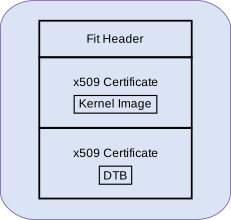
Sources
Core Secdev K3
branch: master
Follow the steps below to create a falcon compatible fitImage:
3.1 Environment setup
export DTB=path/to/dtb
export IMAGE=path/to/kernel-image
3.2 fitImage creation
An Image tree source (its) file describes the structure and contents of the final image produced by the
mkimagetool.To create the
fitImagefor falcon mode, create a filefitImage.itswith the following contents inside thecore-secdev-k3source directory,:
/dts-v1/;

/ {
    description = "Kernel fitImage";
    #address-cells = <1>;

    images {
        kernel-sec {
            description = "Linux kernel";
            data = /incbin/("Image.sec");
            type = "kernel";
            arch = "arm64";
            os = "linux";
            compression = "none";
            load = <0x82000000>;
            entry = <0x82000000>;
        };

        fdt-sec {
            description = "Flattened Device Tree blob";
            data = /incbin/("falcon.dtb.sec");
            type = "flat_dt";
            arch = "arm64";
            compression = "none";
            load = <0x88000000>;
            entry = <0x88000000>;
        };
    };

    configurations {
        default = "conf-falcon";
        conf-falcon {
            description = "Pre-signed Linux kernel, FDT blob";
            kernel = "kernel-sec";
            fdt = "fdt-sec";
        };
    };
};
Sign the kernel and dtb using secure-binary-image.sh and create the
fitImage using mkimage:
# inside core-secdev-k3 source
cp $IMAGE Image
cp $DTB falcon.dtb
./scripts/secure-binary-image.sh Image Image.sec
./scripts/secure-binary-image.sh falcon.dtb falcon.dtb.sec
mkimage -f fitImage.its fitImage
Usage
Falcon Mode makes use of a cut down variant of the tispl binary called
tifalcon.bin with lacks the Cortex-A SPL and it’s DTBs. This file should
be present alongside the existing tispl.bin after building U-Boot for the
Cortex-A core.
tifalcon.bin

The R5 SPL requires both tifalcon.bin and the fitImage (created
in previous steps) to be present in the second partition of the MMC device
specified by the mmcdev environment variable. By default, mmcdev is
set to 1, which implies that the SD card is the boot media. Additionally, the
bootpart environment variable, which defaults to 1:2, specifies that the
second partition of the SD card should be used as the root file system for the
kernel.
To use eMMC instead of SD as the boot media, rebuild the R5 SPL with the following diff:
diff --git a/board/ti/<soc>/<soc>.env b/board/ti/<soc>/<soc>.env
index 82b9f0741bb..73d59ac425c 100644
--- a/board/ti/<soc>/<soc>.env
+++ b/board/ti/<soc>/<soc>.env
@@ -17,8 +17,8 @@ run_kern=booti ${loadaddr} ${rd_spec} ${fdtaddr}

 boot_targets=mmc1 mmc0 usb pxe dhcp
 boot=mmc
-mmcdev=1
-bootpart=1:2
+mmcdev=0
+bootpart=0:1
 bootdir=/boot
 rd_spec=-
List of files required on SD/eMMC for Falcon Mode:
File |
Copy path on SD/eMMC |
Partition |
Description |
|---|---|---|---|
|
|
rootfs (ext4) |
tispl binary without SPL for the A core and DTB |
|
|
rootfs (ext4) |
kernel and dtb fitImage with pre-signed binaries |
Note
Falcon mode requires the boot binaries to be present in the root file system
of either eMMC or SD, even when using raw eMMC boot mode to load
tiboot3.bin.
R5 SPL Memory Map
Standard Boot:
0x80000000 +===============================+ Start of DDR
  512KiB   |   TFA reserved memory space   | CONFIG_K3_ATF_LOAD_ADDR
           |                               |
0x80080000 +-------------------------------+ PRELOADED_BL33_BASE in TFA
 29.5MiB   |         A53 SPL + DTB +       | CONFIG_SPL_LOAD_FIT_ADDRESS
           | Download region for FIT in DFU|
0x81e00000 +-------------------------------+
           |  R5 U-Boot SPL Stack + Heap   |
    2MiB   |       (size defined by        |
           | SPL_STACK_R_MALLOC_SIMPLE_LEN)|
0x82000000 +-------------------------------+ CONFIG_SPL_STACK_R_ADDR
  112MiB   |            Unused             |
0x89000000 +-------------------------------+
  331MiB   | Device Manager (DM) Load Addr |
0x9db00000 +-------------------------------+
   12MiB   |          DM Reserved          |
0x9e700000 +-------------------------------+
    1MiB   |            Unused             |
0x9e800000 +-------------------------------+ BL32_BASE in TFA
   24MiB   |             OPTEE             |
0xa0000000 +===============================+ End of DDR (512MiB)
Falcon Mode:
0x80000000 +===============================+ Start of DDR
  512KiB   |   TFA reserved memory space   | CONFIG_K3_ATF_LOAD_ADDR
0x80080000 +-------------------------------+
 31.5MiB   |            Unused             |
0x82000000 +-------------------------------+ PRELOADED_BL33_BASE in TFA
           |                               | CONFIG_SYS_LOAD_ADDR
   57MiB   |   Kernel + initramfs Image    | CONFIG_SPL_LOAD_FIT_ADDRESS
           |                               |
0x85900000 +-------------------------------+
           |                               |
           |  R5 U-Boot SPL Stack + Heap   |
   39MiB   |       (size defined by        |
           | SPL_STACK_R_MALLOC_SIMPLE_LEN)|
           |                               |
0x88000000 +-------------------------------+ CONFIG_SPL_STACK_R_ADDR
           |                               | K3_HW_CONFIG_BASE in TFA
   16MiB   |          Kernel DTB           | CONFIG_SPL_PAYLOAD_ARGS_ADDR
           |                               |
0x89000000 +-------------------------------+
  331MiB   | Device Manager (DM) Load Addr |
0x9db00000 +-------------------------------+
   12MiB   |          DM Reserved          |
0x9e700000 +-------------------------------+
    1MiB   |            Unused             |
0x9e800000 +-------------------------------+ BL32_BASE in TFA
   24MiB   |             OPTEE             |
0xa0000000 +===============================+ End of DDR (512MiB)
Debugging U-Boot
See Common Debugging environment - OpenOCD: for detailed setup information.
Warning
OpenOCD support since: v0.12.0
If the default package version of OpenOCD in your development environment’s distribution needs to be updated, it might be necessary to build OpenOCD from the source.
Integrated JTAG adapter/dongle: The board has a micro-USB connector labelled XDS110 USB or JTAG. Connect a USB cable to the board to the mentioned port.
Note
There are multiple USB ports on a typical board, So, ensure you have read the user guide for the board and confirmed the silk screen label to ensure connecting to the correct port.
To start OpenOCD and connect to the board
openocd -f board/ti_am625evm.cfg